Wed 10th June 2026 11:28:08
Windows Vista day Zero
Drive Preparation
Since our broadband went offline on
the 29th December, I’d been making backups to DVD of most of the
files and folders on my 2 hard drives. Basically backing up everything,
folder-by-folder, except the Program Files and Windows folders, I cherry-picked
some files inside there to backup (Opera profiles etc). The lack of broadband
gave me lots of extra time I’d otherwise have been chatting online or viewing
webpages, so I decided I’d make better use of the time.
Once we got broadband back (2nd
February!) then got upgraded to MaxADSL (7Mbit yay!), I decided to try
downloading Windows Vista, for experimental/education purposes of course! Well,
if folk I know are going to upgrade their computers to Vista, then phone me up
when something goes wrong, then it’d help if I knew what I was talking about!
So I got the disc image downloaded and
patched for errors, I wrote it to DVD.
2.5Gigs! More on disk space later!
So on Saturday I decided to try
installing it!
I’d run the test program to check my
machine was up to the task and was pleasantly surprised when it told me that my
graphics card WAS compatible and capable of running the Aero interface (glass,
semi-transparent window borders, windows expanding into view and shrinking down
to nothing when closed, and the much-touted 3D-flip task switch).
One thing I knew I needed to do was to
convert my C: drive to NTFS. I had Windows XP Home running on my F: partition
(it was originally on C: then I did a “test” reinstall onto F:, keeping a
dual-boot with C: until I decided the second one was my main OS, then deleted the
one on C:) and C: was just filled with downloaded stuff that I dumped onto DVD,
and of course, the boot files from F:’s XP install (boot files are always on
the first drive).
For legacy reasons (Linux rescue
bootdisks, namely Knoppix) I’d kept the C: drive as FAT32, so that Linux and
anything else, could write files onto at least one partition, because until
very recently, NTFS writing in Linux was potentially buggy, with no perfect
implementation of NTFS.
So I thought “oh, Vista install will
convert the drive for me surely... it can format drives and XP has always had
the “convert” program for it anyway”.
Just in case of any problems in
conversion, I’d backed up all the files I could from the root of the drive.
Luckily...
Put the DVD in, rebooted, tried to
install Windows.... “which drive?”.... c:? “nope”.
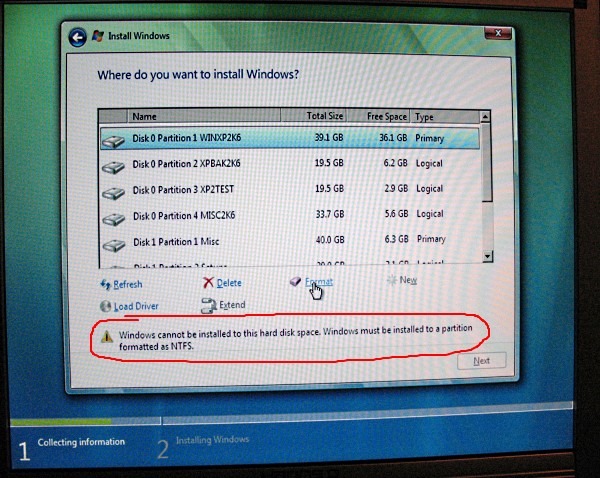
“Bother!” I said. Lol
I didn’t want to just click on
“Format” although I knew this would work, I also knew that I could wave goodbye
to my old XP installation’s bootfiles. As it happened, it would have saved me
an hour of KNOWING I needed to restore the bootfiles rather than what happened
next....
So, rebooted into a DOS-based (with
NTFS) boot CD, which had Partition Magic 8. Tried to convert the drive to
NTFS.... Nope. PM said that it had done it, but on rebooting back into PM, it
was still FAT32.
Ok, so I tried another Disk
Partitioning tool.... went to convert... and as far as I could tell, all it did
was to call XP’s convert.exe file in DOS, which came back with an error message
saying something like it could not convert FAT partition. Bugger.
Eventually I found a program that
would do it, by booting into a “portable” windows XP version that boots from a
CD, then using one of the programs on there. Seemed to work ok.
Rebooted... went to check my old XP
install... and the whole machine hanged after the BIOS screen... not good!
Back into Windows XP Boot CD, drive
properties, corrupt files! Bugger! Ran a scandisk and it sorted some problems.
Reboot again... still no luck. By this
time I’m glad I have a backup computer to google with!
Several tries of fixmbr, fixboot,
bootcfg /rebuild from Windows XP Recovery Console and still wouldn’t work.
Last resort.... format the bloody
thing! So I formatted the partition into NTFS, then recopied my files across from
the backups (gotta love this XP boot CD), fixmbr, fixboot, bootcfg /rebuild
then it finally rebooted into XP with no data loss whatsoever! Hurray!
This was 2 hours after my first boot
of the Vista disc and no further on in installation.
It was after 10pm, and I was pissed
off and tired... so left the Vista installation until the next day...